Maya Workflow Kit for Maya users, in Blender
The whole Maya workflow in Blender, in one install.
Other tools bring one piece over: a pivot tool, a keymap, a shelf. This rebuilds the set together — hotbox and marking menus, Channel Box and Attribute Editor, menu sets, shelves and option windows — on top of Blender's own tools. Installing it changes nothing until you choose Maya.
Nothing changes until you choose Maya
Enabling the extension adds a small Maya | Blender switch at the right of the top bar, an Edit menu entry, the shortcut Ctrl+Alt+Shift+M and, once, a welcome dialog. Your keymap, theme, layout and preferences stay as they are.
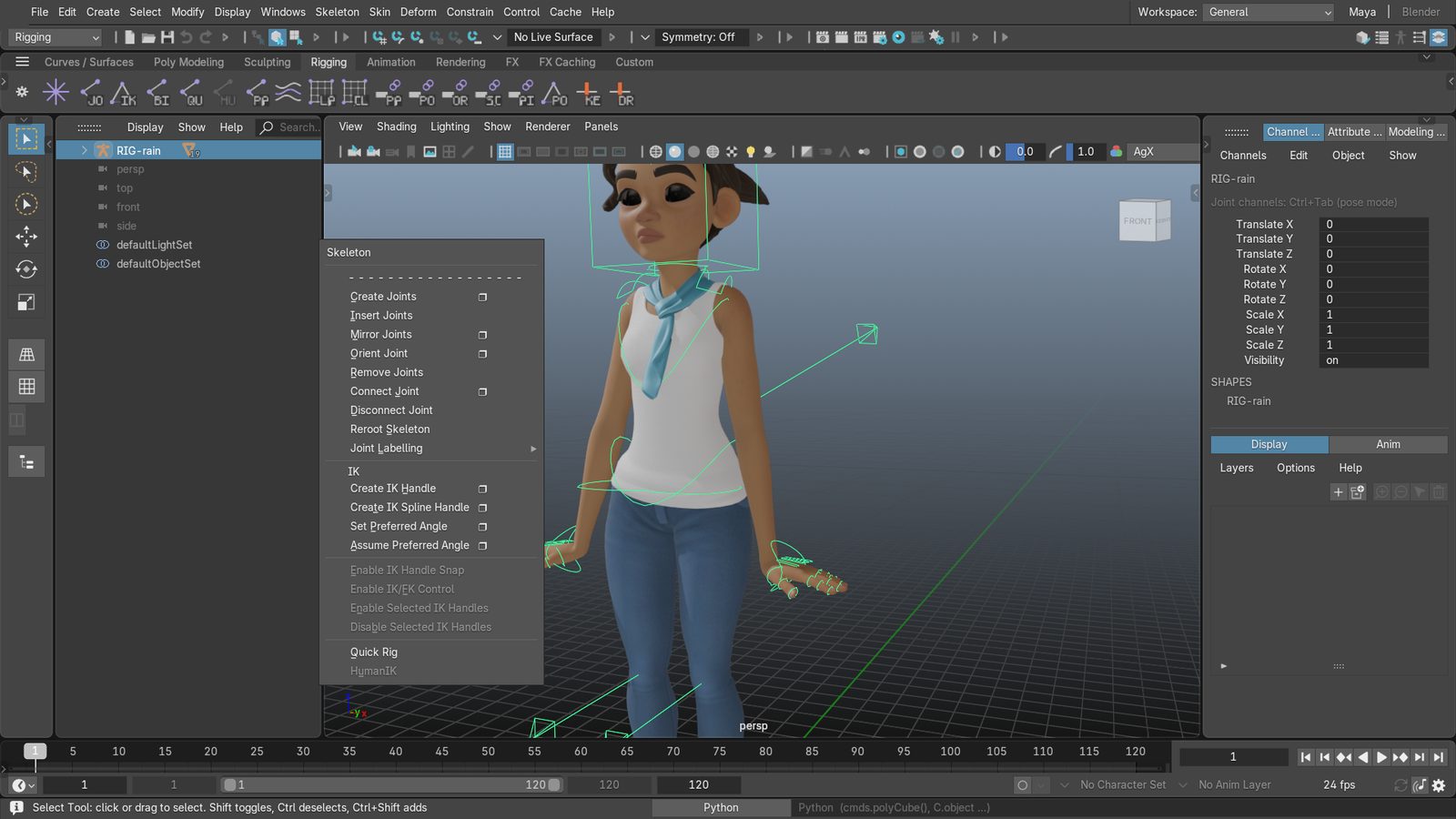
Choose Make Blender feel like Maya and the kit adds its Maya-style keys, menus and panels and the Maya layout in the open file. It never touches your theme, preferences or active keymap. Click Blender in the switch and Blender's own keys and UI are back; switch again whenever a tutorial uses Blender's own keys.


Maya mode — same file, Maya layout and keys.
DOGWALK (CC BY 4.0) Blender Foundation | studio.blender.org, modified
The tour, in half a minute
Scenes: DOGWALK, Rain, Pack Bot and Security Bot rigs (CC BY 4.0) Blender Foundation | studio.blender.org, modified.
Install
Install Maya Workflow Kit
-
Get the zip
Download
maya-workflow-kit-<version>.zipfrom GitHub Releases. The extensions.blender.org listing is not live yet. -
Install from disk
In Blender 4.5 or later: Edit › Preferences › Get Extensions, open the drop-down at the top right and choose Install from Disk…, pick the zip. Or drag the zip onto the Blender window.
-
Choose Maya
Click Make Blender feel like Maya in the welcome dialog — or later, in the add-on preferences or with the Maya | Blender switch. Ctrl+Alt+Shift+M goes back.
Disabling or removing the extension unregisters everything it added — there is nothing else to undo. It writes only your shelves and the Maya project folders you create, and has no network access.
Recommended setup
Optional. The kit leaves your theme and Blender preferences to you; Maya users usually like:
- A dark grey theme: Edit › Preferences › Get Extensions, filter by Themes and install one you like.
- Navigation: Orbit Method Turntable, Orbit Around Selection off, Zoom to Mouse Position off, Auto Perspective on, Zoom Method Dolly with a horizontal axis.
- Undo Steps 256 (Blender's maximum) under System.
- Region Overlap off under Interface › Editors, so side panels sit beside the viewport.
- Only Insert Available under Animation › Keyframes, for Maya-like auto key.
Where Blender's C++ draws the line
Everything here is Python on top of Blender. Some of Maya lives deeper than an extension can reach, so these are not imitated:
- Blender is Z-up and has one pivot per object.
- Dragging over a field with the middle mouse to scrub its value.
- MEL. A Python Command Line with a small
maya.cmdslook-alike is there instead. - Side tabs and operating-system docking of panels.
Every Maya menu item Blender cannot do is still shown, greyed, with a one-line note saying why and what to use instead.
FAQ
Is this just a Maya keymap?
No. The keymap is one part. The kit adds Maya's layout, hotbox and marking menus, Channel Box and Attribute
Editor, menu sets with Maya's menus, shelves, option windows with Maya 2022's factory values, and Maya's scene
concepts — Freeze, Delete History, Center Pivot, groups, centimetres, pCube1.
Will it change my Blender settings?
No. Maya mode adds keys, menus, panels and a layout; it never writes your theme, preferences or active keymap, and never saves preferences. The switch, disabling or removing the extension takes its additions away.
Can I follow Blender tutorials with it installed?
Yes: click Blender in the Maya | Blender switch (or Ctrl+Alt+Shift+M) for plain Blender with the same scene, and switch back afterwards.
Which Blender versions?
Blender 4.5 LTS and 5.0 – 5.2. Earlier versions are not offered the extension.
Does it need Maya installed?
No. It contains no Autodesk code, icons or scripts and never talks to Maya; it rebuilds the behaviour in Blender.
Is it free?
Yes. The code is GPL-3.0-or-later; the kit's own images and data are CC0. Source and issues on GitHub.